Touch Typing Finger Placement: Home Row and Correct Posture
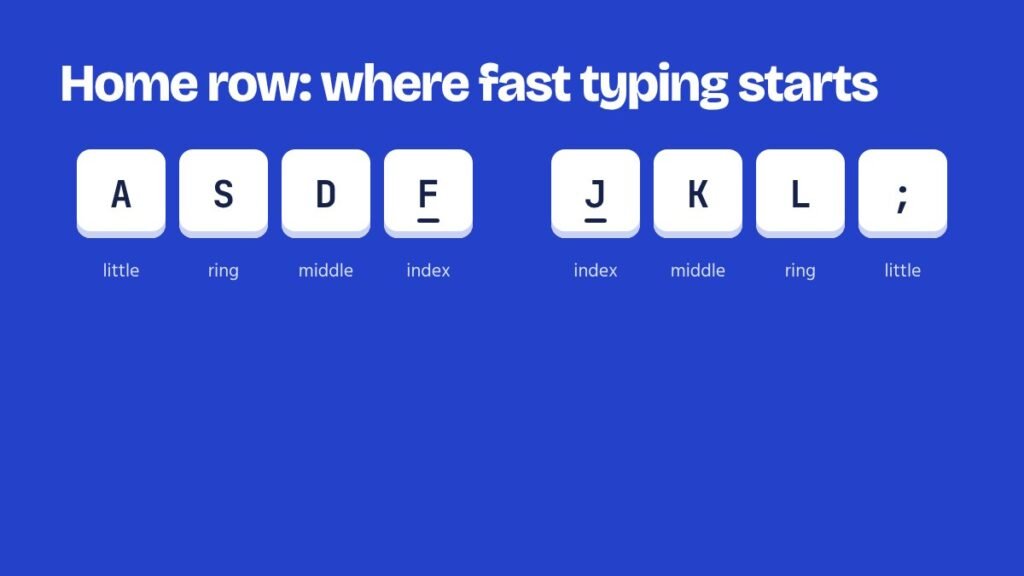
Touch typing means typing without looking at the keyboard, using all ten fingers. Every fast typist does it, and it starts with knowing where each finger lives.
The home row
Rest your fingers like this:
- Left hand: little finger on A, ring on S, middle on D, index on F.
- Right hand: index on J, middle on K, ring on L, little finger on ;.
- Both thumbs rest lightly on the space bar.
Feel the small raised bumps on F and J. They let you find home without looking, every time.
Which finger for which key
Each finger covers a diagonal column. The index fingers cover two columns each, because they are the strongest.
| Finger | Left hand | Right hand |
|---|---|---|
| Little | ` 1 Q A Z, Shift, Tab, Caps | 0 – = P [ ] ; ‘ /, Enter, Backspace, Shift |
| Ring | 2 W S X | 9 O L . |
| Middle | 3 E D C | 8 I K , |
| Index | 4 5 R T F G V B | 6 7 Y U H J N M |
| Thumb | Space bar | |
See it coloured by finger on the typing tutor page, where the on-screen keyboard also lights up the next key during each lesson.
Posture for long tests
- Sit back in the chair with your feet flat on the floor.
- Elbows at about 90 degrees, close to your body.
- Wrists straight and floating slightly above the keyboard, not resting on the desk while typing.
- Screen about an arm’s length away, top edge at eye level.
- Press keys lightly. Hard pressing tires fingers in a 15-minute test.
Two rules for the first month
Always return home. After every reach, your finger goes back to its home key. Never look down. If you are lost, feel for the bumps on F and J. Slow and blind beats fast and looking, because only the first one keeps getting faster.
Practise now
- English Typing TestFree online English typing test with exam-style passages. Check net WPM, accuracy, KDPH and full or…
- Hindi Typing TestFree Hindi typing test online with Mangal (Inscript) and Remington GAIL keyboards built in. Hindi passages…
- Exam Typing TestsFree typing test simulations for SSC CHSL, SSC CGL DEST, CPCT, RRB NTPC, DSSSB, UPSSSC, Supreme…
- Typing TutorFree online English typing tutor with 12 step-by-step lessons: home row, top and bottom rows, capitals,…